One Monday our cloud search service was switched off, with no date for its return. Two of our agent’s tools sat on top of it: one finds the right database table for a question, the other searches the product documentation. Without them the agent still answered, but it answered from memory, and that is exactly what a documentation tool is there to prevent.
We had two choices: wait, or build a local replacement. We built one in a day. It runs as a small container next to the agent’s tool server, needs no cloud account, and starts in about a second. A day later the cloud index came back, so we could finally do what we had skipped: put both on the same questions and see how far apart they are.
This piece continues our series on agent tooling over MCP. The first gave the agent a sandbox for Python, the second passed data by reference, the third tried a small decision model for table lookup, and the fourth gave the agent searchable recall of past chats. That one used funes, which stores its index in the Lance format. Lance comes back here.
What “local RAG” has to replace
A managed search service does four things for you:
- Keyword search (BM25) with stemming and field boosts.
- Vector search, with an embedding model it calls for you at index and query time.
- Fusion of the two lists (hybrid search), and optionally a reranker on top.
- Operations: storage, scaling, an API, keys.
The first three fit in one Python process. The fourth mostly goes away when the corpus is a few thousand documents that change with each release, not every minute. Our documentation is about 2,100 markdown pages (screen help, technical notes, how-tos, release notes), which becomes 9,000 passages. That is small. A laptop CPU handles it.
The stack
| Job | Choice | Why |
|---|---|---|
| Storage, BM25, vector search | LanceDB 0.41 | one embedded library does both kinds of search, files on disk, no server |
| Embeddings | BAAI/bge-small-en-v1.5 via fastembed | 384 dimensions, ONNX on CPU, 33 M parameters |
| Reranker (optional) | jinaai/jina-reranker-v1-turbo-en via fastembed | small cross-encoder, also CPU |
| Agent interface | an MCP tool (FastMCP) or a plain HTTP route | whatever your agent already calls |
No GPU, no model API, no vector database server. The models are downloaded once when the image is built, and the container runs offline.
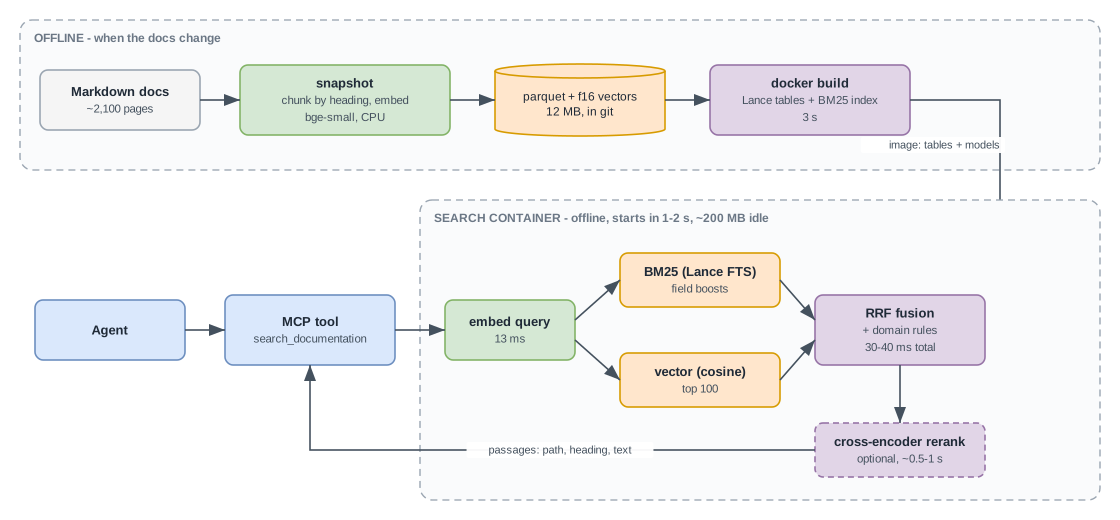
Step 1: chunk and index
Cut each page at its ##/### headings and keep the heading path with the passage. Heading-aligned chunks beat fixed windows because a help page’s sections usually answer one question each, and the heading is the best summary the author gave you.
def chunks(root, max_chars=1600):
    for path in sorted(Path(root).rglob("*.md")):
        text = path.read_text(errors="ignore")
        title = next(iter(re.findall(r"^# (.+)$", text, re.M)), path.stem)
        for section in re.split(r"\n(?=#{2,3} )", text):
            heading = section.splitlines()[0].lstrip("# ").strip() if section.startswith("#") else ""
            for i in range(0, len(section), max_chars):
                yield {"path": str(path.relative_to(root)), "title": title, "heading": heading, "text": section[i:i + max_chars]}


def build(root, data_dir):
    rows = list(chunks(root))
    embedder = TextEmbedding("BAAI/bge-small-en-v1.5")
    vectors = embedder.embed([f"{r['title']} > {r['heading']}\n{r['text']}" for r in rows], batch_size=64)
    for r, v in zip(rows, vectors):
        r["vector"] = v.tolist()
    table = lancedb.connect(data_dir).create_table("docs", data=rows, mode="overwrite")
    table.create_fts_index("text", use_tantivy=False, language="English", stem=True, remove_stop_words=True)
Embed the title and heading together with the text. A passage that says “Press Insert to add a record” means nothing without the “Equipment downtime > Entering events” above it.
Step 2: hybrid search with reciprocal rank fusion
Run both searches, then merge them by rank, not by score. BM25 scores and cosine distances live on different scales, and reciprocal rank fusion (RRF) avoids having to calibrate them: each list gives a document 1 / (60 + rank), and the sums decide.
def search(self, query, k=5):
    vec = next(iter(self.embedder.embed([QUERY_PREFIX + query])))
    keyword = self.table.search(query, query_type="fts").with_row_id(True).limit(50).to_list()
    semantic = self.table.search(vec).distance_type("cosine").with_row_id(True).limit(50).to_list()
    scores, rows = {}, {}
    for hits in (keyword, semantic):
        for rank, r in enumerate(hits):
            scores[r["_rowid"]] = scores.get(r["_rowid"], 0) + 1 / (60 + rank + 1)
            rows[r["_rowid"]] = r
    top = [rows[i] for i in sorted(scores, key=scores.get, reverse=True)[:max(k, 10)]]
    if self.reranker:
        ce = list(self.reranker.rerank(query, [f"{r['title']} > {r['heading']}\n{r['text'][:1000]}" for r in top]))
        top = [r for _, r in sorted(zip(ce, top), key=lambda p: -p[0])]
    return top[:k]
QUERY_PREFIX is the instruction bge models were trained with on the query side (“Represent this sentence for searching relevant passages: “). Passages are embedded without it.
Step 3: expose it as a tool
mcp = FastMCP("local-docs")

@mcp.tool
def search_documentation(query: str, k: int = 5) -> list[dict]:
    """Search the product documentation. Returns passages with file path and heading; cite the path."""
    return search(query, min(k, 10))

mcp.run(transport="http", host="0.0.0.0", port=8080)
That is the whole generic version: about 90 lines, tested on a 300-page sample (686 passages indexed in 70 s on a laptop, 0.5–0.7 s per tool call with the reranker on).
Step 4: the part that is specific to you
The generic pipeline gets you most of the way. The rest came from the eval set, not from the library. In our production version, these changed the numbers:
- Structured fields get their own boosts. BM25 runs over several fields:
title×3, the screen name and code ×3,headings×2,text×1. - Codes in the query are exact signals. When a question names a page code (
MT.0020), that screen’s own help page is pinned to the top. Embeddings blur codes; a filter doesn’t. - Manuals beat release notes, unless the question asks about a version or a release. Release notes mention everything and explain nothing.
- At most two passages per page, so one long page can’t fill the whole result list.
- Popularity as a prior (for the table-lookup tool): a table that many other table descriptions mention is more likely the answer than an obscure view with a similar name. That single prior gave our largest gain there.
Each of these is a line or two of scoring code, tuned against a fixed question set (hit@k, MRR) and re-run after every change. Without that set we would have been tuning by gut feeling.
Step 5: make startup boring
Embedding 9,000 passages takes about 22 minutes on a laptop CPU, so the container must never do it at startup. We split the pipeline into three stages:
| Stage | When | Cost |
|---|---|---|
snapshot: corpus → parquet with rows and float16 vectors | when the docs change; the result is committed | full run about 25 min on a laptop, minutes on a many-core box; unchanged passages reuse their vectors (keyed by a hash of model name and text) |
build: parquet → Lance tables and full-text indexes | docker build | 3 s |
serve: open tables, load models | container start | 1–2 s |
Both corpora (documentation and table descriptions) come to a 12 MB parquet snapshot. The models are baked into the image, and the container runs with HF_HUB_OFFLINE=1 and becomes ready in 4 s with networking disabled. Idle memory is about 200 MB.
The comparison we couldn’t do before
When the cloud index came back, we ran both systems on 15 documentation questions from our agent-scoring suite. Each question has a set of gold page codes: the pages a correct answer has to cite. A result counts as a hit at rank n if the n-th passage belongs to, or names, one of those pages. Both indexes are built from the same markdown knowledge base.
On the cloud side we tried three modes on the same index: keyword only, hybrid (keyword plus text-embedding-3-small vectors, 1,536 dimensions), and hybrid with the service’s semantic reranker. Each question was asked twice: as the short search query an agent writes, and as the raw user question.
Agent-style queries (e.g. “equipment downtime registration screen”):
| System | hit@1 | hit@5 | MRR | p50 latency |
|---|---|---|---|---|
| Local: hybrid + rerank | 0.60 | 0.87 | 0.71 | 0.99 s |
| Local: hybrid, no rerank | 0.60 | 0.80 | 0.70 | 0.03 s |
| Cloud: keyword | 0.40 | 0.80 | 0.57 | 0.87 s |
| Cloud: hybrid | 0.67 | 1.00 | 0.81 | 1.10 s |
| Cloud: hybrid + semantic rerank | 0.53 | 0.80 | 0.67 | 1.18 s |
Raw user questions (e.g. “How is equipment downtime registered? Is it the same as a planned outage, and where do I record it?”):
| System | hit@1 | hit@5 | MRR | p50 latency |
|---|---|---|---|---|
| Local: hybrid + rerank | 0.47 | 0.87 | 0.64 | 1.11 s |
| Local: hybrid, no rerank | 0.47 | 0.80 | 0.57 | 0.04 s |
| Cloud: keyword | 0.27 | 0.67 | 0.47 | 0.92 s |
| Cloud: hybrid | 0.47 | 0.93 | 0.63 | 1.17 s |
| Cloud: hybrid + semantic rerank | 0.53 | 0.73 | 0.61 | 1.31 s |
How to read this:
- Cloud hybrid is the best system on clean queries. It found a gold page in the top 5 for all 15. Its larger embedding model shows here, especially on short queries with little keyword overlap.
- On raw questions the two are level (MRR 0.64 vs 0.63). Long, chatty questions need the reranker; without it the local MRR drops to 0.57.
- Keyword-only search is clearly worse on both sides. If your “local RAG” is only BM25, you are leaving 15–25 MRR points behind.
- The cloud’s semantic reranker didn’t help on this set. It moved some gold pages up to rank 1 and pushed others out of the top 5. Measure before you pay for it.
- Fifteen questions is a small sample. One question moves hit@k by 0.067. Treat differences under about 0.1 as noise. On our full 69-question documentation set the local engine scores hit@5 0.83, MRR 0.64, consistent with the numbers above.
Table lookup: where the domain rules pay off
The second tool maps a question to one of about 3,300 table descriptions. The cloud index has the same descriptions (3,298 documents, text-embedding-3-small vectors, semantic configuration). Same procedure: 15 questions from the suite, gold = the tables a correct answer uses.
| System | Agent query: hit@1 | hit@5 | MRR | Raw question: hit@1 | hit@5 | MRR |
|---|---|---|---|---|---|---|
| Local: hybrid + priors + rerank | 0.53 | 0.87 | 0.67 | 0.67 | 0.80 | 0.72 |
| Cloud: keyword | 0.27 | 0.33 | 0.33 | 0.13 | 0.40 | 0.26 |
| Cloud: hybrid | 0.27 | 0.53 | 0.40 | 0.27 | 0.73 | 0.49 |
| Cloud: hybrid + semantic rerank | 0.47 | 0.87 | 0.62 | 0.33 | 0.73 | 0.49 |
Here the picture flips. Table names are dense abbreviations and many tables share most of their words (“daily totals per site”, “monthly totals per site”, a read-only daily summary of the same). Generic relevance can’t separate them; the popularity prior, the time-grain cue (“daily”, “monthly”) and the expansion of abbreviations in names can. The cloud’s semantic reranker earns its cost on this index (MRR 0.40 → 0.62 on agent queries), but stays far behind on raw questions.
One honest caveat for both tools: the local weights were tuned on the suite these 15 questions come from. That is an in-sample advantage the cloud index doesn’t have. It matters most for the table lookup, where the rules are most specific. Read the table-lookup gap as “domain rules are worth a lot”, not as “the local engine is generally better”.
How fast is it?
| Step | Median |
|---|---|
| Embed the query (bge-small) | 13 ms |
| BM25 + vector search, top 100 each | 30–40 ms |
| Cross-encoder rerank, 20 passages | ~1,000 ms |
| Cross-encoder rerank, 10 passages | ~500 ms |
| Retrieval is effectively free; the reranker is where the time goes. Reranking 10 passages instead of 20 halved the cost with no change on agent-style queries (MRR 0.71 both) and a small loss on raw questions (0.64 → 0.61). If your agent writes good search queries, which a tool description can ask for, you can switch the reranker off and answer in about 40 ms. |
The cloud numbers include the round trip from a laptop in Europe to a US region and, in hybrid mode, the service’s own call to the embedding model. In the same region they would be lower. The local numbers have no network hop at all.
Pros and cons
| Local | Cloud search service |
|---|---|
| No account, no keys, no egress: the docs never leave the box | Managed: scaling, availability, security reviews done by someone else |
| Index is a file: versioned with the code, reproducible, diffable | Index lives in the service; rebuilding is a pipeline, not a commit |
| Every ranking rule is yours to change and test (table lookup: MRR 0.72 vs 0.49 on raw questions) | Ranking knobs limited to what the service exposes |
| 30–40 ms without rerank | Larger embedding models available out of the box |
| Runs in air-gapped and customer-hosted installs | Handles millions of documents and frequent updates |
| You own tuning, model updates and the eval set | Better first-try quality on short, generic queries (docs: MRR 0.81 vs 0.71) |
| ~2 GB image with models and runtime; CPU-heavy reranker | A standing monthly bill per search unit, plus embedding calls |
What to expect if you do this
- Day one: the generic pipeline above, a container, and the agent’s tools switched to it. The agent cites real pages again.
- Day two: an eval set of 50–100 real questions with known answers, and the domain rules from Step 4. This is where you get close to the cloud’s hybrid mode.
- Ongoing: re-run
snapshotwhen the docs change, and re-run the eval when you touch a weight. Swapping the embedding model means re-embedding everything, so pick one and keep it. - Not for: corpora that change by the minute, millions of documents, or many languages (bge-small is English; there are multilingual models, but evaluate them first).
Limits
- Embedding size matters on short queries. A 384-dimension CPU model is cheap and good, but not as good as a 1,536-dimension API model on terse, low-overlap queries. Domain rules and a reranker close most of the gap; they don’t erase it.
- The cross-encoder is a CPU tax. About a second for 20 passages. Size the container for it, or limit it to long questions.
- The eval set is the product. Every number in this article comes from a question set someone had to write and grade. Without one you can’t tell whether a change helped, and you can’t compare against anything.
- Tuned in-sample. Our weights came from the same question suite as the comparison. A fair rematch needs a held-out set written after tuning.
Wrap-up
A cloud search index is convenient, not irreplaceable. For a corpus of a few thousand documents, an embedded engine with BM25 and vectors, a small CPU embedding model and reciprocal rank fusion gets you a working replacement in a day. With a handful of domain rules and a reranker, it lands within noise of the cloud’s hybrid mode on documentation questions, a step behind on clean short queries, and well ahead on table lookup, where the domain rules do the work. In return, the index is a file in your repository, the ranking is code you can test, and nothing leaves the machine. The pipeline is the easy part. What we would build first next time is the question set.